Was ist Pulse Ox auf deiner Garmin — und was sagt es dir?

Deine Garmin misst die Blutsauerstoffsättigung. Hier erfährst du, was ein normaler Wert bedeutet, was ein niedriger Wert anzeigt und warum du es nachts eingeschaltet haben solltest.
Tag 57: Pulse Ox erklärt
Pulse Ox verfolgt die Sauerstoffsättigung im Blut — ein Prozentsatz, der Ihnen sagt, wie viel Sauerstoff Ihr Blut tatsächlich transportiert.
Was die Zahlen bedeuten
Ein gesunder Wert liegt zwischen 95% und 100%. Wenn er unter 90% fällt, bekommt Ihr Körper nicht genug Sauerstoff. Auf Meereshöhe und in Ruhe ist das ein Signal, dem man Beachtung schenken sollte.
Niedrige Pulse Ox-Werte können hinweisen auf:
- Schlechte Schlafqualität — Ihre Atmung könnte in der Nacht flach oder unterbrochen sein
- Höhenkrankheit — je höher Sie gehen, desto dünner die Luft und desto niedriger die Werte
- Schlafapnoe — wiederholte Abfälle unter 90% während des Schlafs sind ein klassischer Frühindikator
Wann man tatsächlich darauf achten sollte
Eine einzelne Messung während des Tages sagt nicht viel aus. Wichtig ist der Trend während des Schlafs. Wenn Sie regelmäßig über Nacht unter 90% fallen, ist das ein Thema, das Sie mit einem Arzt besprechen sollten — es ist nichts, was man ignorieren sollte.
Für Höhenathleten und Wanderer ist Pulse Ox auch während der Aktivität nützlich: Es zeigt Ihnen, wie gut sich Ihr Körper an die dünnere Luft anpasst, bevor Sie die Auswirkungen spüren.
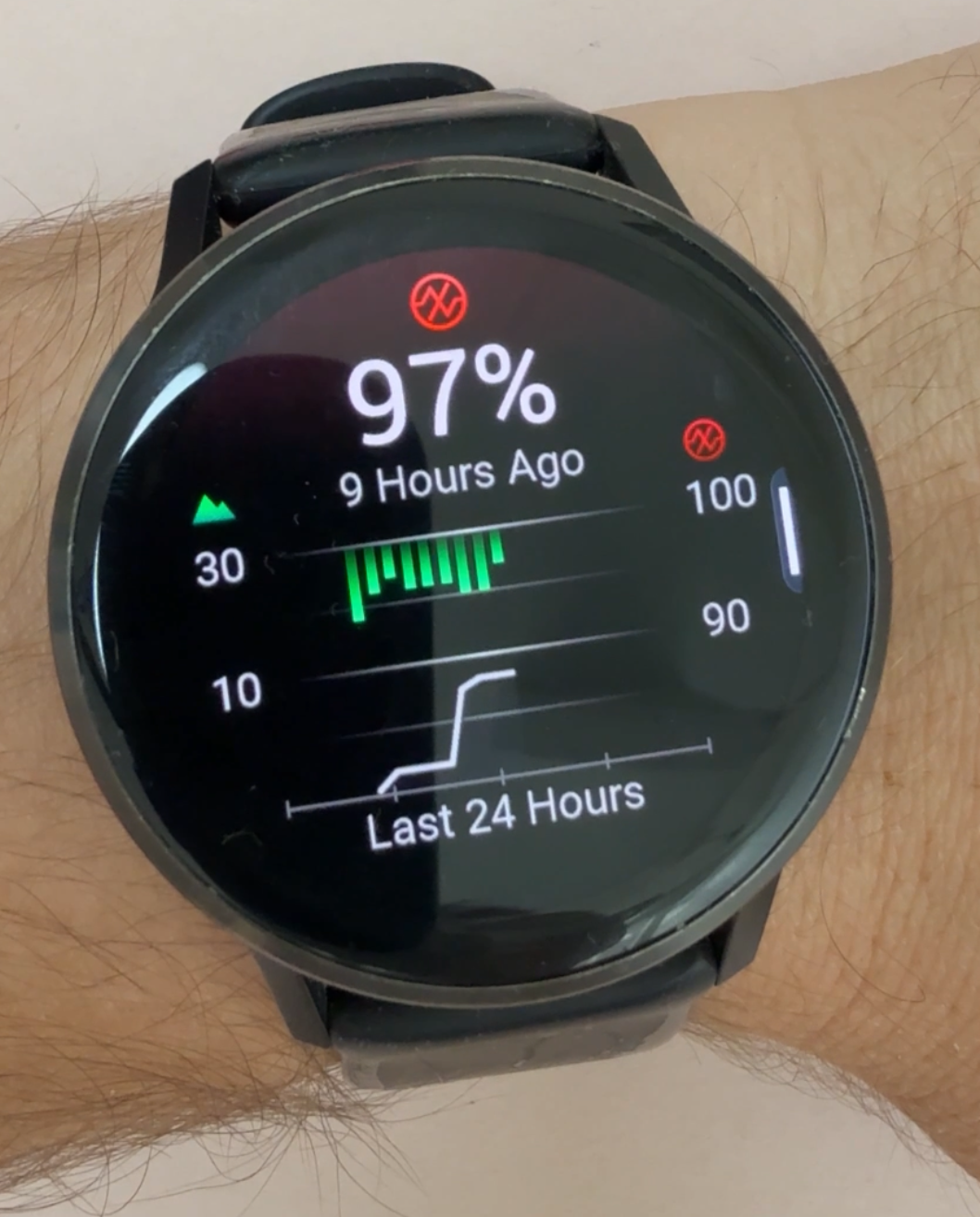
Den Pulse Ox-Bildschirm lesen
Wenn Sie die Pulse Ox-Historie auf Ihrem Garmin öffnen, sehen Sie zwei Dinge, die auf demselben Diagramm überlagert sind:
- Grüne Balken — das sind Ihre SpO2-Werte. Die Balken hängen von oben im Diagramm herunter. Ein kurzer Balken bedeutet, dass Ihr SpO2 nahe 100% liegt (gut). Ein langer Balken, der weiter herunterhängt, bedeutet, dass Ihr Sauerstoffgehalt niedriger war, näher bei 90%.
- Weiße Linie — das ist Ihre Höhe. Sie zeichnet auf, wie hoch über dem Meeresspiegel Sie sich im Laufe des Tages befanden. Garmin fügt sie hinzu, weil die Sauerstoffwerte natürlicherweise abnehmen, wenn die Höhe zunimmt. Das Höhenprofil hilft Ihnen zu verstehen, wie sich Ihre SpO2-Werte relativ zu Ihrer Höhe ändern — so können Sie erkennen, ob ein Abfall erwartet wurde (weil Sie höher gestiegen sind) oder ob es sich auf Meereshöhe lohnt, genauer hinzusehen.
Wenn die weiße Linie steigt und die grünen Balken länger werden, ist das ein normaler Höhen-Effekt. Wenn Ihre Balken länger werden, während die weiße Linie flach bleibt, lohnt sich ein genauerer Blick.
Wie man es einschaltet
Standardmäßig misst Pulse Ox möglicherweise nur auf Abruf. Um die kontinuierliche Überwachung über Nacht zu aktivieren:
- Gehen Sie auf Ihrer Uhr zu Gesundheit & Wellness
- Wählen Sie Pulse Ox
- Stellen Sie es auf Während des Schlafs oder Ganztägig ein
Hinweis: Der Ganztagsmodus entlädt Ihre Batterie schneller. Während des Schlafs ist für die meisten Menschen der beste Kompromiss — Sie erhalten die Daten, die wirklich wichtig sind, ohne die Akkulaufzeit während des Tages zu opfern.
Das könnte dich interessieren
 Tag 1561
Garmin PacePro erklärt: So bestimmt deine Uhr das Tempo deines Rennens
Ein 10-km-Lauf in 50 Minuten ist nicht einfach 5:00 pro Kilometer. PacePro passt dein Zieltempo an jeden Anstieg der Strecke an und folgt der gewählten Pacing-Strategie, damit du deine Zielzeit trotzdem erreichst.
 Tag 1557
Deine Garmin ist ein Lichtschalter: Philips Hue und dein Smart Home steuern
Ja, du kannst dein Smart Home mit deiner Garmin steuern. Lumicoe bringt deine Philips-Hue-Lampen ans Handgelenk, und es gibt auch Apps für Home Assistant und Google Home.
Am häufigsten gelesen


Zifferblätter, die sich lohnen
Watchface
Cockpit
Everything you need to track your day on one clean, cleverly laid-out watchface, with colours you change right on the watch and a second time zone.
Watchface
Goals Pro
The most popular Garmin watchface, upgraded: the same goal rings with full control over colours, fonts, analog or digital time, and long-press shortcuts.
Watchface
Titan
A premium, data-dense watchface built for athletes who want maximum information at a glance.