What Is Pulse Ox on Your Garmin — and What Does It Tell You?

Your Garmin tracks blood oxygen saturation. Here's what a normal reading looks like, what a low one means, and why you should have it on during sleep.
Day 57: Pulse Ox Explained
Pulse Ox tracks your blood oxygen saturation — a percentage that tells you how much oxygen your blood is actually carrying.
What the numbers mean
A healthy reading is between 95% and 100%. Drop below 90%, and your body isn't getting enough oxygen. At sea level and at rest, that's a signal worth paying attention to.
Low Pulse Ox readings can point to:
- Poor sleep quality — your breathing may be shallow or interrupted during the night
- Altitude sickness — the higher you go, the thinner the air and the lower the readings
- Sleep apnea — repeated dips below 90% during sleep are a classic early indicator
When to actually look at it
A single reading during the day doesn't tell you much. What matters is the trend during sleep. If you're regularly dropping below 90% overnight, that's worth discussing with a doctor — it's not something to ignore.
For altitude athletes and hikers, Pulse Ox during activity is also useful: it tells you how well your body is adjusting to thinner air before you feel the effects.
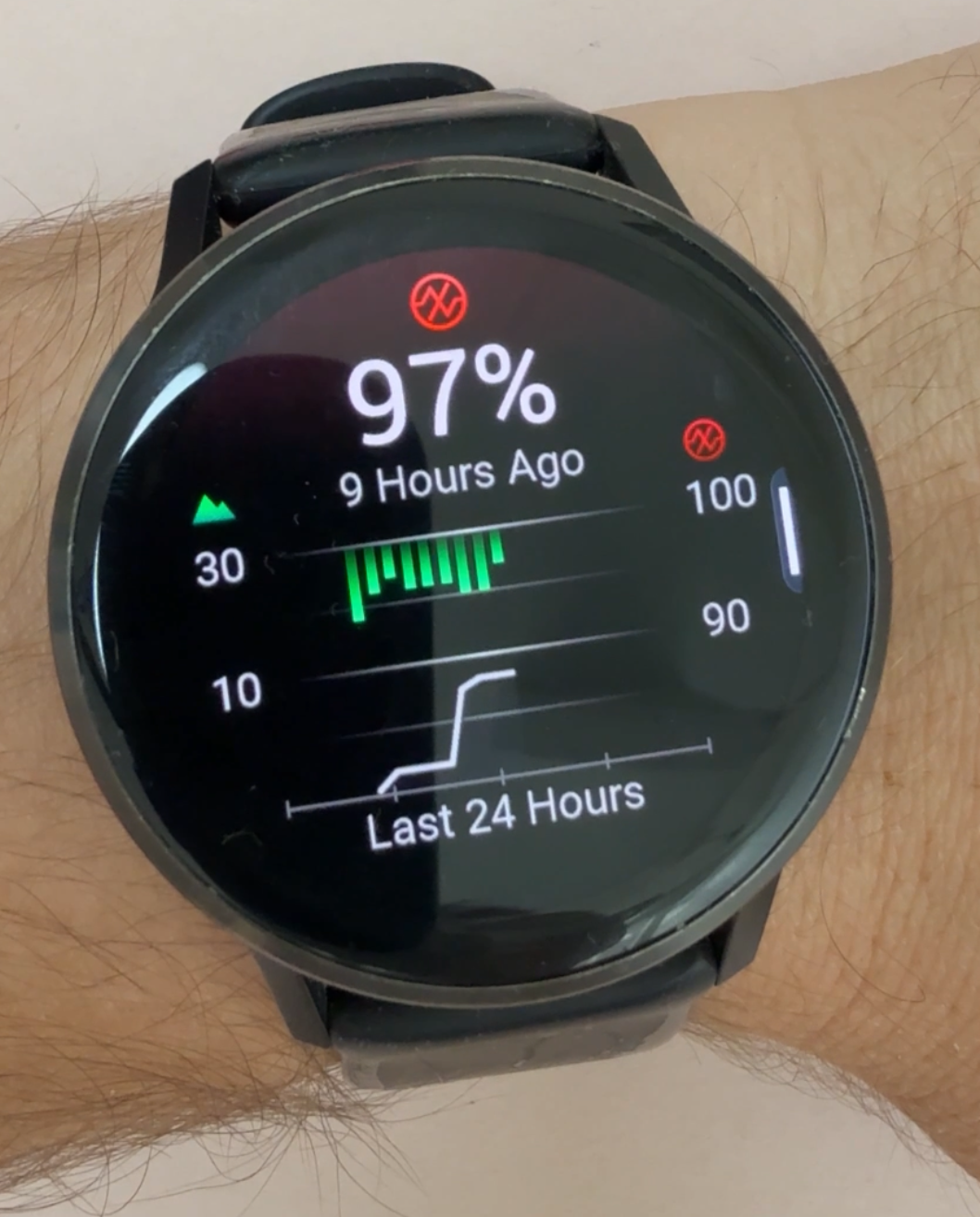
Reading the Pulse Ox screen
When you open Pulse Ox history on your Garmin, you'll see two things overlaid on the same chart:
- Green bars — these are your SpO2 readings. The bars hang down from the top of the chart. A short bar means your SpO2 is close to 100% (good). A long bar hanging further down means your oxygen level was lower, closer to 90%.
- White line — this is your elevation. It traces how high above sea level you were throughout the day. Garmin includes it because oxygen levels naturally decrease as altitude increases. The elevation profile helps you understand how your SpO2 readings are changing relative to your altitude — so you can tell whether a dip was expected (you were climbing higher) or something worth paying closer attention to at sea level.
When the white line rises and the green bars get longer, that's a normal altitude effect. If your bars are getting long while the white line stays flat, that's worth a closer look.
How to turn it on
By default, Pulse Ox may only measure on demand. To enable continuous overnight tracking:
- On your watch, go to Health & Wellness
- Select Pulse Ox
- Set it to During Sleep or All Day
Note: All Day mode will drain your battery faster. During Sleep is the best balance for most people — you get the data that actually matters without sacrificing battery life during the day.
What to read next
 Day 1561
Garmin PacePro Explained: How Your Watch Can Pace Your Race
Running a 10K in 50 minutes isn't just 5:00 per kilometre. PacePro adjusts your target pace for every hill on the course and follows the pacing strategy you choose, so you still hit your goal time.
 Day 1557
Your Garmin Is a Light Switch: Control Philips Hue and Your Smart Home
Yes, you can control your smart home from your Garmin. Lumicoe puts your Philips Hue lights on your wrist, and there are apps for Home Assistant and Google Home too.
Popular reads


Watchfaces worth installing
Watchface
Cockpit
Everything you need to track your day on one clean, cleverly laid-out watchface, with colours you change right on the watch and a second time zone.
Watchface
Goals Pro
The most popular Garmin watchface, upgraded: the same goal rings with full control over colours, fonts, analog or digital time, and long-press shortcuts.
Watchface
Titan
A premium, data-dense watchface built for athletes who want maximum information at a glance.