Cos'è il Pulse Ox sul tuo Garmin — e cosa ti dice?

Il tuo Garmin misura la saturazione di ossigeno nel sangue. Ecco cosa significa una lettura normale, cosa indica un valore basso e perché dovresti averlo attivo durante il sonno.
Day 57: Pulse Ox Explained
Pulse Ox tracks your blood oxygen saturation — a percentage that tells you how much oxygen your blood is actually carrying.
What the numbers mean
A healthy reading is between 95% and 100%. Drop below 90%, and your body isn't getting enough oxygen. At sea level and at rest, that's a signal worth paying attention to.
Low Pulse Ox readings can point to:
- Poor sleep quality — your breathing may be shallow or interrupted during the night
- Altitude sickness — the higher you go, the thinner the air and the lower the readings
- Sleep apnea — repeated dips below 90% during sleep are a classic early indicator
When to actually look at it
A single reading during the day doesn't tell you much. What matters is the trend during sleep. If you're regularly dropping below 90% overnight, that's worth discussing with a doctor — it's not something to ignore.
For altitude athletes and hikers, Pulse Ox during activity is also useful: it tells you how well your body is adjusting to thinner air before you feel the effects.
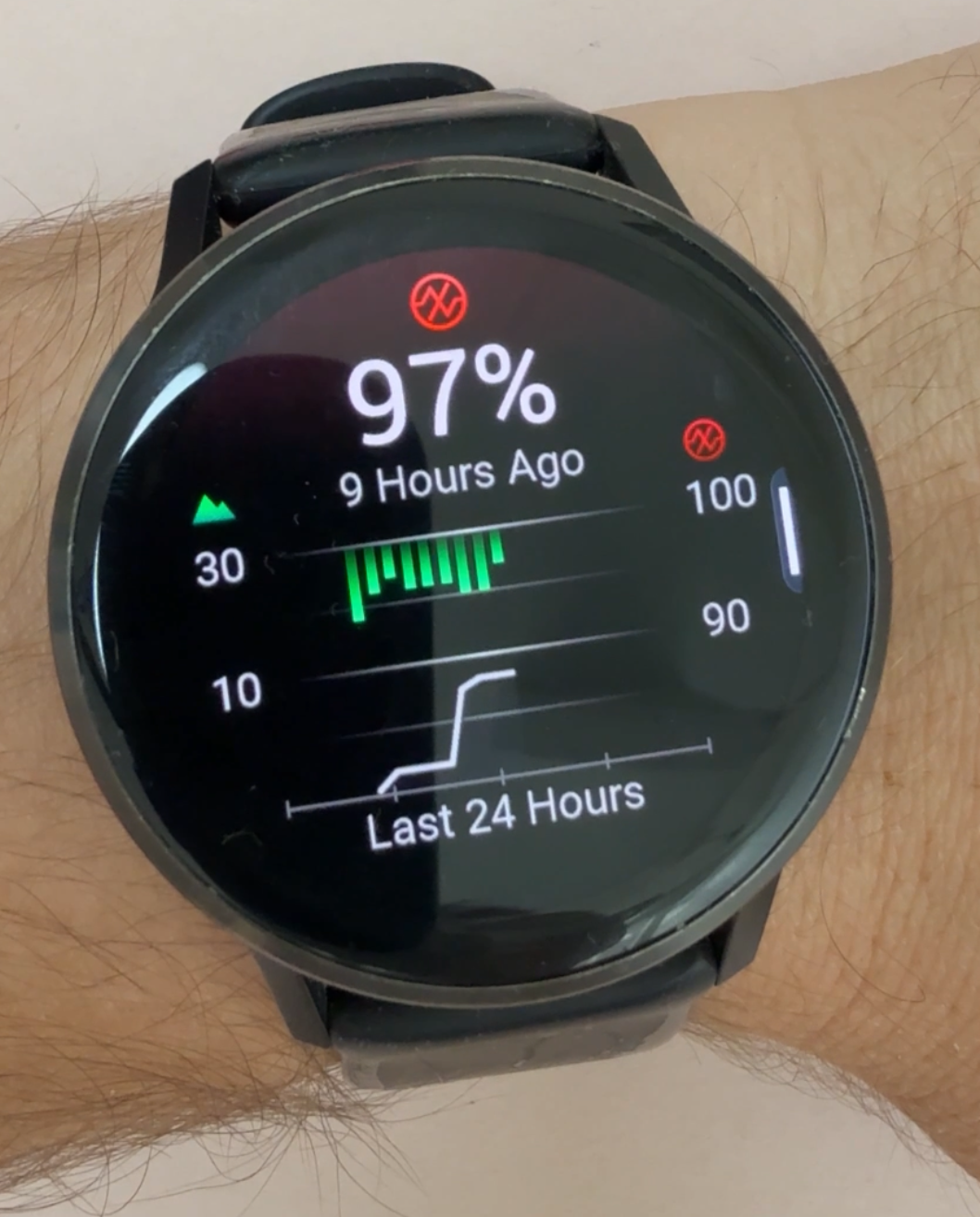
Reading the Pulse Ox screen
When you open Pulse Ox history on your Garmin, you'll see two things overlaid on the same chart:
- Green bars — these are your SpO2 readings. The bars hang down from the top of the chart. A short bar means your SpO2 is close to 100% (good). A long bar hanging further down means your oxygen level was lower, closer to 90%.
- White line — this is your elevation. It traces how high above sea level you were throughout the day. Garmin includes it because oxygen levels naturally decrease as altitude increases. The elevation profile helps you understand how your SpO2 readings are changing relative to your altitude — so you can tell whether a dip was expected (you were climbing higher) or something worth paying closer attention to at sea level.
When the white line rises and the green bars get longer, that's a normal altitude effect. If your bars are getting long while the white line stays flat, that's worth a closer look.
How to turn it on
By default, Pulse Ox may only measure on demand. To enable continuous overnight tracking:
- On your watch, go to Health & Wellness
- Select Pulse Ox
- Set it to During Sleep or All Day
Note: All Day mode will drain your battery faster. During Sleep is the best balance for most people — you get the data that actually matters without sacrificing battery life during the day.
Unisciti alla Garmin School
Lascia la tua email per accedere alla Garmin School e ricevere aggiornamenti sui nuovi video e app.
Cosa leggere dopo
 Giorno 1071
Crea un allenamento Garmin con Claude e caricalo con un clic
Descrivere un allenamento nel builder di Garmin Connect è tedioso. Descrivilo a Claude, scarica il JSON che genera e caricalo direttamente nel tuo calendario Garmin con lo strumento della Garmin School.
 Giorno 1064
Perché il logo Garmin è un triangolo? (Non è quello che pensi)
L'ipotesi ovvia è la triangolazione GPS. È sbagliata su due fronti — il triangolo è più recente di quanto si pensi, e il GPS non usa nemmeno la triangolazione.


